Blog

AT for Independence in the Kitchen Part 2: Adapted Measuring

To set the stage for Adapted Measuring, hopefully you have read Part 1 of the blog series AT for Independence in the Kitchen – Adapted cutting. While I want you to keep our same individual case studies in mind as we think about the next step in the cooking process,  I want you to take a moment and think about someone in your life who might face challenges in the kitchen.

In Part 2, we are going to talk about how to be more independent in measuring the ingredients you have assembled and making something delicious!

The Recipe

Is there difficulty in holding or seeing a recipe?  There is AT to help with that!

If the person wanting to cook cannot hold or easily see the recipe, they cannot be expected to complete their cooking project.  What a shame it would be to not get to devour the delicious ingredients you have prepared!

A simple book stand can be used to hold a single paper recipe or a cook book.  If the chef has a visual impairment or just has difficulty reading small print, there are books stands with full page magnifiers attached to enlarge the visual field for better access.  

If you have joined the digital age and access recipes from Pinterest, an online cooking blog or saved from an email there are stands for a tablet.  I really like the one that easily attaches to and is removeable from the cabinet.  It allows you to move it around the kitchen as you need and saves the counter space for the fun cooking activities.  Using a digital recipe format also provides the opportunity for a screen reader to provide instructions in an auditory format or to use videos for visual/auditory support in cooking.  

Chef with limited reading skills?  Using video or visual recipes provides extra support for the cooking steps. There are many creative ways to allow for hands free access to the recipe material.

visual recipe

Ingredient manipulation

So, you have decided what you are making and can see what steps need to be followed. Now you need to measure, scoop, pour, weigh and otherwise manipulate your ingredients.

There are lots of assistive technology options to help ensure you put the right amount of each ingredient in your masterpiece.

Large print and high contrast labels on measuring cups and spoons help those with low vision identify the correct amounts.

For a chef who is blind there are talking measuring cups that can provide added support to ensure accurate measurements.  A talking measuring cup can also be a benefit to a chef who experiences a cognitive impairment. Furthermore, using a talking scale with large buttons and display can be a great option for quantity measurement for someone with visual, cognitive or physical limitations.  There is even a tactile measuring cup to provide tactile feedback on acquiring the correct measurement of ingredient.


While adapted wooden spoons or spoons for stirring or mixing can be difficult to find, there are many cheap and easy modifications to the handles that you can make with things around the home.  A universal cuff can help create a better grip for those with limited grip strength, dexterity or hand range of motion.  

universal cuff

What about things that need to be poured, whether a dry or liquid ingredient? There is assistive technology that can aid in pouring or manipulating pourable ingredients.

When lifting and pouring a carton presents a challenge a carton holder can help with pouring from a half-gallon carton by giving a sturdy handle to improve grip-ability of the container. This can benefit a chef with limited muscle or hand strength, as well as someone with limited range of motion.  Another option if the individual has limited strength and/or the physical skills to lift and pour is The Tipper, which will provide support in tipping and pouring ingredients.

A universal cuff has many applications.  I mentioned above that is can be used to help with holding and using kitchen utensils.  It can be used to help hold spices needing to be measured and aid in giving food the proper seasoning.

It can be so frustrating when the ingredient you need is secure in a can or jar that refuses to open – when using two hands!  This can be a deal breaker situation for individuals needing one handed access to such containers.  Luckily, there are a wide variety of one handed options for can and jar openers that make these tasks accessible for individuals with limited hand dexterity.  Similarly, a Scoop and Release cookie dropper can be used for more than making cookies.  Any semi-sticky concoction such as deviled egg filling, chicken salad, meatball mixture (and more!) can be scooped and dropped using this one handed device.

I don’t know about you, but I really hate when I am trying to mix my ingredients and the mixing bowl will not stay in place!  A mixing bowl holder will keep the bowl in the desired position and keep it from sliding and spinning – making mixing more accessible.  

Though it once may have seemed daunting, by using a combination of affordable, easy to obtain tools you or a loved one can experience an increase in independence for all phases of cooking –  preparing and combining ingredients into the appropriate container and having them ready for the oven or the table.

Be on the watch for Part 3 of the series where we explore assistive technology to aid increasing independence in the best part of the cooking process – eating!


AT for Independence in the kitchen Part 1: Adapted Meal Prep Devices

Mary, an elderly grandmother, wants to teach her grandchildren her secret family recipe, but arthritis, dominant hand tremors and failing vision prevent her from using her standard kitchen apparatus.

Caleb, a 20 year old with Cerebral Palsy, wants to move out and live on his own, but due to functional limitations in his arms and hands his family is worried about his ability to make himself meals if no caregiver is available.

Sarah, a mother diagnosed with Multiple Sclerosis, wants to continue the family tradition of hosting Sunday night family meals for her grown children and their families, but due to muscle weakness she in unable to safely use standard kitchen tools.

Laura, a 25 year old with a recently acquired Spinal Cord Injury, wants to keep hosting girls night get togethers, but limited arm range of motion and grip strength present challenges for preparing food without assistance.

Nothing brings a family and friends together the way food can. Food centered activities offers so many opportunities for meaningful moments in an individual and family’s life. Cooking is an activity that presents opportunities for independence, enjoyment and social engagement for friends and families. However, for many individuals mealtime activities present significant, if not insurmountable challenges due to physical challenges or safety concerns.

In this 3 part blog series we will explore assistive technology that can help make mealtimes more accessible and help create opportunities that increase independence, safety and social-relational experiences.  

Let’s start at the beginning.

Traditionally, most meal prep tasks are best performed with the use of two, steady, well coordinated hands, not to mention the visual-perceptual skills that are also required. This series of tasks can present challenges for individuals with disabilities that affect dexterity, range of motion, grip and vision skills.

Good news!  There is assistive technology that can help.

I could not possibly cover all options, but we will look at a couple of options with broad applications for meal prep tasks: Adapted cutting boards and adapted knives.

Adapted cutting boards and cutting surfaces

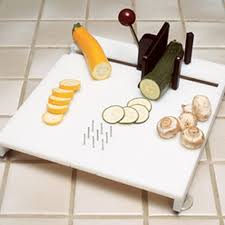
These help convert two-handed meal prep tasks into one handed tasks. Several commercially available adapted cutting boards exist.  They have similar features, such as suction and non-slip bases. All have some option for securing food in place, whether by raised edges, pins or vice -like clamps.  These features allow the individual to secure food to the surface and then cut, spread or prep using only one hand.  This can also allow the individual to have a 2nd hand free to aid in balance if needed. They can be placed on tables, counters and even wheelchair trays.  One option has a knife attached on a pivot to increase safety related to tremors or limited grip.  This is even helpful for individuals who have an ability to use two hands, but has unsteady hands. It is not all about cutting.  For example, using the raised edges in the corner, you can place a piece of bread and spread peanut butter and jelly without having to hold the bread in place.

Adapted Knives

There are several types of adapted knives, but my preference is a rocker style knife.  This model of knife helps an individual who cannot exhibit the needed pressure to cut food with the first effort.  They can rock the knife back and forth until they make the cut.  There are horizontal and vertical grips available to allow for the most comfortable and functional arm/wrist positioning. These grip options improve the safety of cutting for an individual with reduced grip strength, tremors, joint range of motion or pain issues.  

Utilizing an adapted cutting surface and knife creates opportunities to improve independence and participation in cooking and meal prep activities. For an individual with a disability, increased participation in meal time can lead to noticeable differences in an individual’s social engagement, independence and quality of life.  For members of their family there can be a reduction of stress and worry, as well as an increase in their enjoyment of family activities those of us without a disability take for granted.

Be on the watch for Part 2 of the series where we explore assistive technology to aid in the measuring aspect of cooking activities!

The Limitless Future of Assistive Technology in Society

“Know from whence you came. If you know whence you came, there are absolutely no limitations to where you can go.”

~ James Baldwin

I know, I know.  Maybe an overused inspirational quote, but it’s SO GOOD! I love it for a lot of reasons.

With regard to the world of assistive technology (AT) and accessibility, in order to have a vision of what is possible, we have to understand where the industry and the people affected have been.  And once we are aware of this, as a society we can build on the endless possibilities to help create a society that works for people of all ages and all abilities.

Even if history or government were not your favorite subjects in school, there are interesting things to learn from the history of assistive technology with regard to innovation and legislature.  

  • Low-tech assistive technology, such as the walking cane, has existed since approximately sometime in the 17th century.
  • Higher technology innovation in assistive technology really made its mainstream debut in the late 1800’s. – 1892 with the first Braille typewriter and 1898 with the first electric hearing aid.  
  • The initial catalyst for the development of more advanced assistive technology and legislature to regulate access to assistive technology started following WWI when veterans returned from war with injuries, desired to go back to work, but required adaptations or AT to enable them to return to the work force.
  • 1918 The Vocational Rehabilitation Act provided funding for state-administered vocational rehabilitation programs.
  • 1965 Medicaid (title XIX) and Medicare (title XVIII) allocated funding for services to people with permanent disabilities and guided access to medically necessary assistive technology.  
  • 1973 The Rehabilitation Act expanded services to include individuals with mental and emotional disabilities, and expanded services beyond employment into medical and living concerns of persons with disabilities. Its mandates called for increased services and training in community, school and vocational service areas.
  • 1975 The Education of the Handicapped Act established the obligation of each public education system to provide a free and appropriate education to all children, 5 years and above.
  • 1988 The Technology Related Assistance for Individuals with Disabilities Act (Tech Act) specifically addressed the AT needs of people with disabilities with an increase in funding to states to provide technology, resources and advocacy. It was felt that both high and low technology and adaptations would substantially benefit the nation by reducing dependency costs at work and home. 
  • 1990 The Individuals with Disabilities Education Act (IDEA) set expectations and obligations for the access to AT for students in the public school system, ensuring that students are provided access to a quality education in the least restrictive environment AND that they are provided with any AT required to make their academic pursuits successful.
  • 1990 The Americans with Disabilities Act (ADA) is legislation that guides access for people with disabilities to community and public spaces, including guidelines for architectural features for renovations and new construction.  This legislation had a primary goal of unrestricted physical access to public environments – ramps, doors, stairs, curb cutouts, signage, with policies and practices incorporated as well.  

Along the way innovators started getting creative and looking at ways to develop assistive technology that matched the needs of individuals in school and work environments.

We know that high tech AT innovation started back in the late 1800s.  But what about over the last 40 years?

  • Oct 21, 1976 – Invention of first Kurzweil Reading Machine
  • Sep 21, 1981 – First computers used to aid in learning
  • Feb 6, 1982 – Dragon Systems (voice recognition) founded
  • Jan 26, 1983 – Dynavox founded (AAC systems)
  • Sep 6, 1984 – Universal Design for Learning – – Center for Applied Special Technology
  • Jul 7, 1991 – First SmartBoard
  • Apr 11, 1996 – Kurzweil Founded (Software to support Learning Disabilities)
  • Jun 15, 1996 – FM amplification for students with hearing loss
  • Few major developments between 1996 and 2008
  • Feb 5, 2008 – Next Generation Perkins Brailler released (first modification in 57 years!)
  • Apr 20, 2009 – Smart Table
  • Apr 6, 2010 – Apple Products: iPad, iPod, iPhone (forever changing AT options for schools and people with visual impairments)
  • 2013 – GoBabgyGo starts adapting electric ride on cars for children with mobility impairments to provide independent mobility
  • In recent years there have also been significant developments of robots, apps and augmented reality systems to support people with a range of disabilities and help them navigate the daily activities in their life.
(information credit: https://www.timetoast.com/timelines/history-of-assistive-technology?print=1)

Okay, so I promise the history lesson is over.  

Where can we still go?  Where do we still NEED to go?

I think two of the biggest areas where society and the community overall are lacking are:

1) a consistent understanding of universal design concepts and the benefits they offer within society

and

2) effective inter-agency collaboration that ensures a continuity of services resulting in the greatest level of independence and ability for persons with disabilities to more easily contribute to society.

I want to offer a discussion on a few areas I believe there are the greatest opportunities for improvement. Making changes in these areas has the potential of making a difference in the overall quality of experiences for persons with disabilities in the community. And, as I have mentioned before – see Assistology’s blog Universal Access and Design – adjustments we make as a society toward higher levels of inclusivity and accessibility benefit all members of a community, not just those with a disability.

1. If builders, architects and Universal Design experts were to collaborate and develop a certification for accessibility, similar to a GREEN or LEED certifications that buildings can currently obtain, many possibilities exist.

  • There could be an increase in consistency in the accessibility of building design and higher levels of accommodation available both in structure and interior design concepts;
  • Businesses would expand their clientele due to increased accommodations and accessibility;
  • Persons with disabilities would gain more independence in more settings, and person’s without disabilities would likely have a more enjoyable experience as well.
  • As Stuart Shell points out in the Forte Building Science paper “Why Buildings Designed for Autistic People are Better for Everyone buildings designed to be accommodating for a disability are better for everyone.

2. I feel strongly that architects and other building science industries need additional education on accessible design – beyond the bare minimum structural requirements that ADA mandates.  When creating a floor plan design, the average architect does not typically consider:

  • Drawer & cabinet locations and think about if a person in a wheelchair (or with other mobility impairments) can unload the dishwasher and put dishes or silverware away while in their wheelchair based on their design;
  • The positive effects on safety in independent living housing that it offers to have a light go on in the entryway when the front door opens;  
  • The locations of light switches with regard to ease of access and safety throughout the rooms.  
  • That while the ADA guidelines for clearance (to allow a wheelchair proper space for a standard turning radius) work for someone in a standard, manual wheelchair (that has a small physical footprint), these clearances are inadequate for someone in a large, powered wheelchair that has to maintain a reclined position – significantly increasing the device footprint and thus increasing the necessary clearance for turning.  

Designing a space with these types of considerations in mind are things all people would benefit from – but to my knowledge no one is emphasizing these ideas in the education process.

I have asked architects who on their design team considers accessibility beyond ADA. Their responses have been, “No one.” and, “We probably have a lot to learn in that area.”

If the Universal Design concepts were emphasized as part of the education process in construction education, interior design, architecture, environmental engineering, industrial engineering and other related fields, community spaces could be designed based on  the 7 Principles of Universal Design from the beginning, resulting in a significantly more accessible environment.  But, how can practices change if at the point of education these concepts are omitted?

3. One issue that is eternally frustrating for me, and probably any AT provider, is the silo approach to service delivery due to the funding structure, restriction and limitations for disability services.  I could write a book on what needs to be done on this.  But the main point I want to make is that when we restrict providers to functioning only within their team, in their setting we do a disservice to the individual needing services – the person we are supposed to be helping.   

AT policies that restrict the use of a purchased device to one setting significantly limit the individual’s ability to become proficient (due to lack of practice), as well as inhibit them from having unrestricted access to their preferred activities.  

Funding restrictions that discourage providers from communicating with new care team members through a transition – such as from acute care to home health – results in duplicate work as the new team often has to establish baselines and their own and spend time they could be working with the individual tracking down information the previous team had.  

When funding is SO restricted that providers feel pressure to not spend an extra 5 minutes once their role is “complete” there is a breakdown in the process and the individual suffers as a result.

4.  Architecture and physical building structures are not the only area of community access and supports that needs to get inspired by designing policy for all abilities. Insurance pays for assistive technology and durable medical equipment (i.e. commodes, wheelchairs, hospital beds, communication devices) that they deem medically necessary for a person’s daily function.  However, there is minimal, if any, funding made available to people with disabilities and their families to purchase assistive technology that would aid someone in daily tasks and increase their independence and quality of life.  

Recently, I asked a Nebraska state funding coordinator about funding options for individuals for purchasing items for daily living and independence (like adapted kitchen or eating utensils).  Her actual response to me was that no one funds these types of purchases; that they didn’t need to worry about it because the person would have someone around to do the task for them.  Simply because of “that’s the way we have always done it” attitudes, we are denying individuals the opportunity to expand their skills and level of independence; limiting their opportunities to contribute to society; increasing reliance on state programs; denying them dignity of self-care and ignoring their right to a quality of life.

This is WRONG on so many levels! An approach to services that assumes an individual prefers to have someone perform tasks for them such as brushing their teeth, feeding, taking off their shoes, making their phone calls, turning their book pages and other tasks we take for granted is archaic and uninspired.  It is time to break the chains of current policy and find a better way to do things.

You may be asking, 

“What would the outcomes be if there was more funding geared toward non-medically necessary assistive technology intended for independent living goals?”

In short, this would allow:

  1. more elderly to age in place;

  2. better support to individuals desiring to seek employment or volunteer and contribute to society;  

  3. creation of a community where people of all abilities have more options for residential living;

  4. provide added motivation for performing self-care activities – reducing dependence on caregivers;

  5. improved social engagement.  

  6. All of these things ultimately lead to a final result of having stronger communities.

Remember that quote we reflected on 5 pages ago? Once we understand where we have been, we can envision all the places we can go.

We can do SO much more and SO much better.

Okay, so maybe (especially for #3 and #4) this is a little bit of a call to action.  But the bigger the voice, the more things can change!  For issues that are a result of legislation – talk to your senators, start petitions, start an advocacy group or social media campaign. Find a way to make your voice heard for the greater benefit of society.

All members of society deserve an opportunity to pursue their dreams and goals.


What Working with People with Disabilities has Taught Me

People with disabilities and their families are the source of inspiration of my career, so essentially they are responsible for teaching me everything.

Throughout the years I have observed countless incidents when families did not have access to (or it did not exist) a technology solution to meet their loved ones needs.  I went into rehab engineering to make an impact on the assistive technology solutions that are available to individuals who need them, and to revolutionize the service delivery process to ensure all individuals have the opportunity to participate in activities that bring meaning to their life.

In the spirit of “paying it forward”, I want to share the top 15 life lessons I personally have gained from serving people with disabilities and their families in my lifetime.

  1. Never underestimate yourself

  2. There is always a solution to the problem, even if it isn’t apparent at first

  3. Don’t be afraid to try and fail

  4. When people work together great things can happen

  5. You can always find a reason to smile

  6. Small accomplishments are still accomplishments

  7. The power of perseverance and what it truly means to be a “fighter”

  8. To always be kind because you have no idea what someone else is struggling with

  9. As a community, inclusion makes us stronger

  10. Regulations that are designed to empower persons with disabilities benefit us all

  11. Compassion is the most important and most powerful attribute a person can posses 

  12. You can learn a lot if you sincerely listen

  13. If you truly believe in something, advocate, advocate, advocate.

  14. There is more good than bad in the world, you may just have to shift your perspective to see it.

  15. We have a long way to go before there is really equal access to life’s activities for persons with and without a disability

Universal Design is Good for the Community

You’ve heard of it. But have you ever really thought about what those 2 words mean, individually and together? Have you considered the implications for unrestricted access to life’s activities that come along with them?

Universal is defined as: of affecting or done by all people or things in the world or in a particular group; applicable to all cases.

Design is defined as: a plan or drawing produced to show the look and function or workings of a building, garment, or other object before it is built or made.

When combined, Universal Design becomes more than a buzz word. Universal Design becomes a PHILOSOPHY that benefits the community.  Universal Design becomes a VERB that promotes inclusion in all settings and for all activities.  

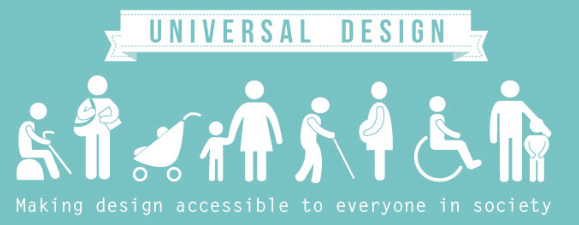
The idea of Universal Design, aka designing for all, emerged in the 1990’s and focuses on establishing social inclusion for the broadest population of individuals. The Centre for Excellence in Universal Design presents a clear description of what is meant by Universal Design and highlights its applicability and benefit to the community as a whole.

“Universal Design is the design and composition of an environment so that it can be accessed, understood and used to the greatest extent possible by all people regardless of their age, size, ability or disability. An environment (or any building, product, or service in that environment) should be designed to meet the needs of all people who wish to use it. This is not a special requirement, for the benefit of only a minority of the population. It is a fundamental condition of good design. If an environment is accessible, usable, convenient and a pleasure to use, everyone benefits. By considering the diverse needs and abilities of all throughout the design process, universal design creates products, services and environments that meet people’s needs. Simply put, universal design is good design.

I know, no design is perfect.  However, by embracing a philosophy of designing for all, and being aware of the 7 principles of universal design as we modify environments, create curriculum, design buildings and create devices – we can continue to move the focus of design toward promoting the fullest social inclusion possible.

Although the phase “Universal Design” is most often used with regard to architecture and physical accessibility of the environment, and this is the area most often considered, it spans beyond the physical structures that surrounds us.  Let’s review these 7 principles for Universal Design (as presented by the Centre for Excellence in Universal Design) and consider some examples.

Principle 1: Equitable Use – The design is useful and marketable to people with diverse abilities.

Principle 2: Flexibility in Use – The design accommodates a wide range of individual preferences and abilities.

Principle 3: Simple and Intuitive Use – Use of the design is easy to understand, regardless of the user’s experience, knowledge, language skills, or current concentration level.

Principle 4: Perceptible Information – The design communicates necessary information effectively to the user, regardless of ambient conditions or the user’s sensory abilities.

Principle 5: Tolerance for Error – The design communicates necessary information effectively to the user, regardless of ambient conditions or the user’s sensory abilities.

Principle 6: Low Physical Effort – The design can be used efficiently and comfortably and with a minimum of fatigue.

Principle 7: Size and Space for Approach and Use – Appropriate size and space is provided for approach, reach, manipulation, and use regardless of user’s body size, posture, or mobility.

Any examples pop into your mind?

Let’s consider a few pieces of assistive technology used in the mainstream (thus meeting principle #1), reflect on why they were originally created, and why they benefit us all.

  1. Automatic door opener – You know, those big blue or silver buttons (principle #4) that let us open the doors to building or spaces without the use of our hands.  These were conceptualized and created for ease of access for people with mobility challenges.  But they are beneficial to EVERYONE (principle #1).  Let me tell you, as a mom of two young children, who always has my hands full beyond capacity, this device is a LIFE SAVER.  Who doesn’t appreciate the option of opening the door with the light press of an elbow, knee, foot or hip – or even the wave of a hand (principles #2,3 & 6)!?
  2. Voice recognition software – In the 90’s this software was created for computers to allow transcription from unrecorded dictation.  This is different that using an audio recorder, and then transcribing on playback.  This is a game changer.  As long as the user has reasonably understood speech patterns (principles #1 &#6) they simply speak into a microphone and the computer program or internet browser receives the signal and written language is produced. And it goes beyond just writing.  It accepts commands to DO things.  Move the mouse, click on links, manipulate the computer.  I see the light bulb going on – yes, kind of like the original Siri.  So, jump forward 15 years and we are giving verbal commands to our phones, computers, devices like the Google Home or Amazon Echo, and even our cars (principle #2).  This one is a little weak on principles #3 and #5, but continues to get better.  BUT, this creates a medium for people without upper extremity mobility to interact with and CONTROL their environment.  To do things for themselves! Now, that benefits everyone!
  3. Push button can openers – I can’t say for certain the original intent and targeted audience for this device, such as the One Touch Can Opener, however, I can conjecture that is was for someone who struggled with grip strength, such as someone suffering from arthritis, and was unable to turn the handle on a traditional can opener.  So, to solve that problem someone created a can opener that connects by a magnet and removes the lid safely with the push of a button (principles #2,3,5,6 &7).  And just like that, a problem was potentially solved for any person with limited hand mobility due to arthritis, Cerebral Palsy, ALS, Multiple Sclerosis, amputation, neuropathy, joint contractures, deformities of the hands, a caregiver holding a fussy child with only one hand free – the list can go on and on.  I doubt the person who designed this device conceptualized the immense impact a simple design change could have for a HUGE population of people (principles #1 & #2)

I am not oblivious to the fact that there will always be challenges in taking a universal design approach.  Such as,

  • No user is average, and no two users will experience the technology/environment in the same capacity or way.
  • What is considered accessible is highly dependent on the unique user, meaning what one user experiences as a barrier or solution may not be the same or apparent for someone else with (or without) a disability. 
  • Barriers that affect people with auditory, visual, sensory and/or psycho-social disabilities are often invisible to other users and often get overlooked.  

But it’s about changing the way we think through the design process.

Changing our perspective in seemingly insignificant ways can have significant impacts on what we produce – just keep that push button can opener example in mind next time you face an opportunity to solve a problem with a small change in perspective.

P.S. For an interesting read, and to see how the concept of universal design can be applied beyond the assistive technology world, see the link below.  Jon Reed summarized Mike Miles’ four principles of inclusive design.  While the article is specifically referring to digital designing, many of the same principles apply to designing anything for universal accessibility.   http://diginomica.com/2017/04/04/dont-design-for-average-design-for-inclusion-mike-miles-four-pillars-of-inclusive-design/